 Delhi Metro Game
Delhi Metro Survival 3D
Loco Pilot guide
Open Loco Pilot from the game lobby. In the Yellow Line cab, wait for the green signal prompt, then use the up control above the lever to move out of neutral. Watch the speed display to confirm the train is moving.
Play Delhi Metro Survival 3DStart the Yellow Line train
- LineYellow
- DepartureSamaypur Badli
- Next stationRohini Sector 18, 19
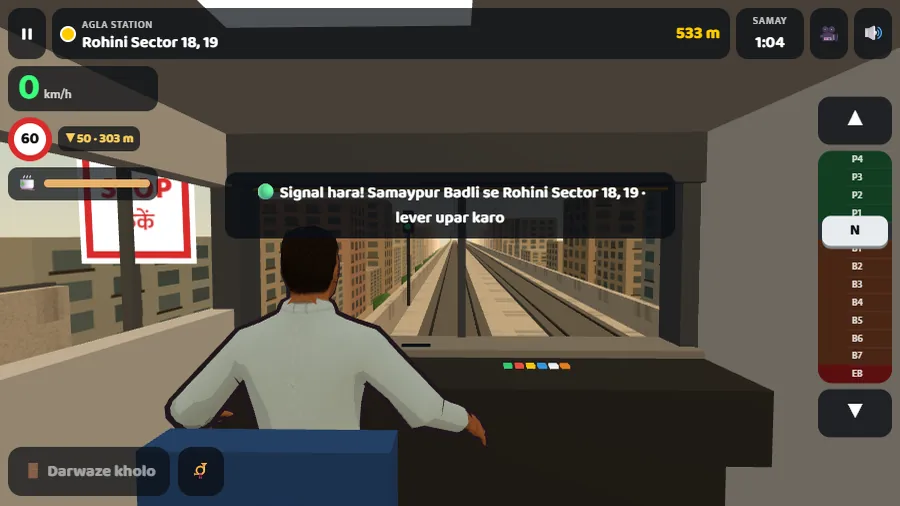
- Check the prompt. Signal hara means the signal is green. Lever upar karo asks you to raise the lever.
- Move out of neutral. Find the up control above the lever and click or tap it. The indicator should leave N and move into the green power range.
- Confirm motion. Watch for the speed to rise from zero and the distance to the next station to decrease. If speed stays at zero, check the lever position and reread the cab prompt before trying again.
Watch the lever and speed change
In the clip, the train starts at 0 km/h in neutral, with Rohini Sector 18, 19 ahead. To check that power engaged, look for the speed readout to change from 0 to 1 km/h. We observed that change after one press of the up control on both desktop and simulated touch.
The cab shows the current speed limit and warns of a lower limit ahead. Read the values shown in your own run. This recording covers departure through initial acceleration.
Watch the next part of the same runPause, end the shift or try again
- Use the pause icon in the cab to stop for a moment. Choose the in-game resume option to return to the same run.
- Choose Shift khatam to finish the shift and see the score. If you end the shift before the first stop, the result can show Shift adhoori (“incomplete shift”). The replay option returned our guest session to a fresh cab at zero speed.
- For Bunty’s on-foot opening and the station entrance, follow the Story first-run guide. If the game window is blank or touch input is unresponsive, see the controls and recovery guide.
The desktop and simulated touch checks covered departure, ending a shift and replay. Platform stops and the full route were outside this check.