 Delhi Metro Game
Delhi Metro Survival 3D · Story mode
Bunty’s first day
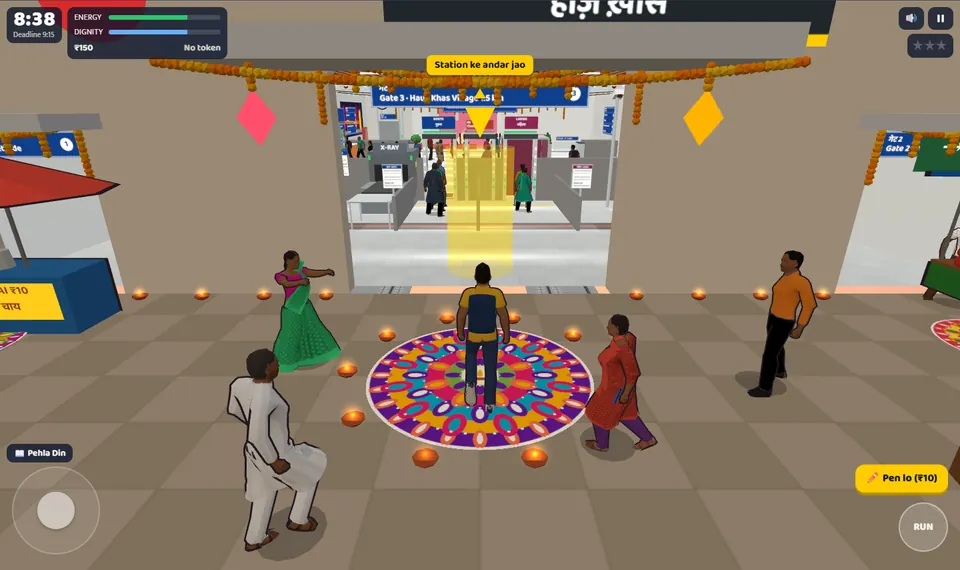
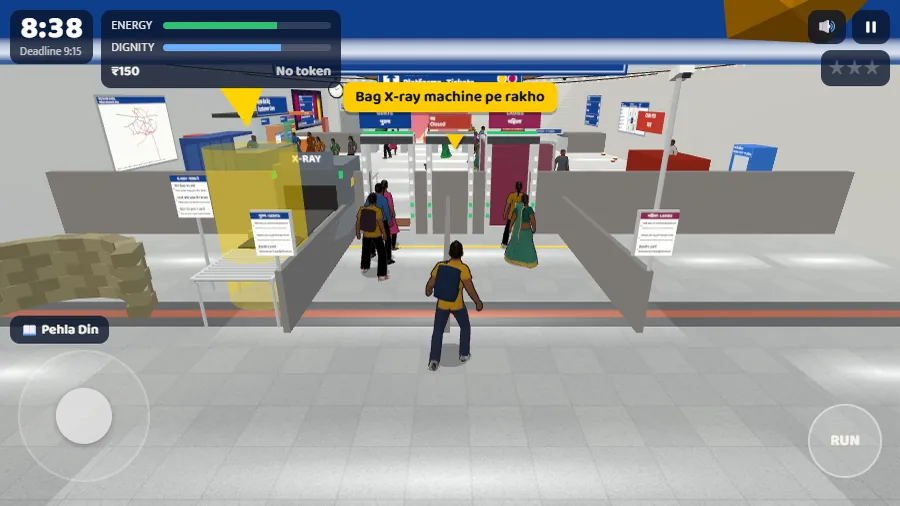
Start Pehla Din, enter Hauz Khas and find the bag X-ray machine. The pictures below show the two yellow markers you’ll see on the way to security.
- Starting stationHauz Khas
- Story objectiveRajiv Chowk · Gate 7
- Deadline9:15 in-game
Start the chapter and reach security
01 · In the lobby
Choose the story chapter
Press Play on the game page. In the game window, select the yellow Tap karke shuru karo button (“tap to start”), then choose guest play if prompted. Select the first story chapter, Pehla Din (“first day”), and advance the introduction with Chalo! (“let’s go”). If you’re looking at a train cab, you selected Loco Pilot instead.
02 · Outside Hauz Khas
Follow the marker into the doorway
Station ke andar jao means “go inside the station.” On a keyboard, focus the game and press W towards the yellow marker; on a phone, push the left joystick forward. If the marker moves off screen, turn the camera first, then walk.
A nearby vendor may show Pen lo next to ₹10. That’s a separate prompt. Follow the doorway marker to advance this objective.
03 · Inside Hauz Khas
Find the bag X-ray machine
When Bag X-ray machine pe rakho appears, the game is asking you to put the bag on the scanner. Follow the new yellow marker to the left. E is the interaction key on desktop; on a touch screen, use the action control shown by the game.
Use the objective text to confirm which checkpoint you’re at. Our screenshots cover the entrance and the next marker. They don’t show clearing security, catching the train or reaching Gate 7.
Watch the approach to the station
Compare Bunty’s starting position with yours. If your game still says Station ke andar jao, keep following the yellow marker through the doorway. The X-ray prompt appears after the entrance.
Watch the next part of the approachFind Hauz Khas to Rajiv Chowk on the game map
You can check Bunty’s destination from the lobby before starting the chapter. In our desktop browser session, the route card showed a direct Yellow Line ride towards Samaypur Badli.
- FromHauz Khas
- DirectionTowards Samaypur Badli
- ToRajiv Chowk
- Open Map from the lobby. If the Inaam rewards panel covers the map, close it with its × button so you can select a station.
- Choose where to start. Search for Hauz Khas in Station dhoondo (“find a station”) and select the result. Check that Hauz Khas appears under Kahan se (“from”).
- Choose the destination. Search for and select Rajiv Chowk. It appears under Kahan tak (“to”). Check the direction and change count on the route card before closing the map.
Our route card showed 9 stations, 0 changes, 21 min and ₹32. These are in-game figures. Gate 7 and the 9:15 deadline come from the Story objective. Close the map and choose Story mode to start that chapter.
If you get stuck
- The movement keys don’t respond.
- Click inside the game first. On touch screens, use the left joystick and drag on the right side to change the view.
- The vendor prompt is showing instead of the bag prompt.
- Move away from the vendor and follow the doorway marker. Look for the new yellow marker only after entering the station.
- The browser game is blank.
- Open Controls & help in the game window, then try Reload game or use the original in a separate tab. If you’re already playing, try the game’s pause or resume controls first; reloading may lose unsaved progress.