 Delhi Metro Game
Delhi Metro Survival 3D
Delhi Metro Game controls
Click inside the game before using the keyboard. On a touchscreen, move with the left joystick and drag on the right to look around. The train cab has its own on-screen controls.
Move Bunty in Story mode
Keyboard and mouse
- Move
- W A S D
- Look
- Move the mouse inside the game
- Run
- Shift while moving
- Interact
- E when the action prompt appears
- Pause
- Esc or use the game’s pause control
Phone and tablet
- Move
- Hold and drag the left joystick
- Look
- Drag on the right side of the game
- Run
- Use the on-screen Run control
- Interact
- Tap the action control when it appears
- Pause
- Tap the game’s pause control
Try two short challenges
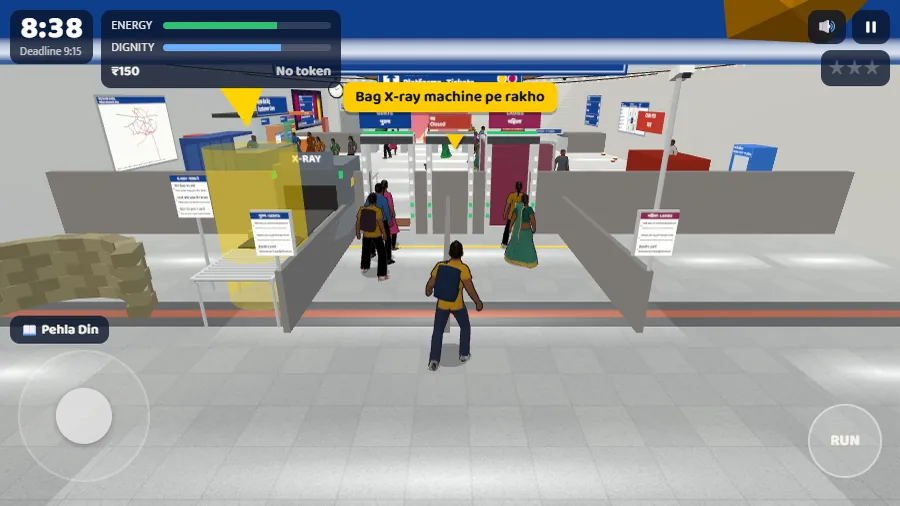
- Reach the checkpoint in Story. Enter Hauz Khas and find the X-ray machine. Stop when the bag prompt appears and compare it with the screenshot. See the entrance and security steps.
- Get the train moving in Loco Pilot. In the Yellow Line cab, raise the lever out of neutral and confirm the speed rises from 0 km/h. Use the in-game pause, result and replay controls for another departure. See how to restart a shift.
Fix a blank window or unresponsive controls
- Check for the start button. Select Tap karke shuru karo when it appears and choose guest play if prompted.
- Click or tap back into the game. If the scene is visible but input stopped, return focus to the game. If it is paused, Wapas khelo means resume.
- Use the player’s Controls & help. If the window stays blank, try Reload game. If it still fails, try the original in a new tab. Reloading may lose unsaved progress.